· Mark Lester Mahilum · Tutorials · 7 min read
Automate MedSpa Consultation Booking From Ad to Chair
From ad click to confirmed visit — automate every step of medspa consultation booking and cut no-shows.
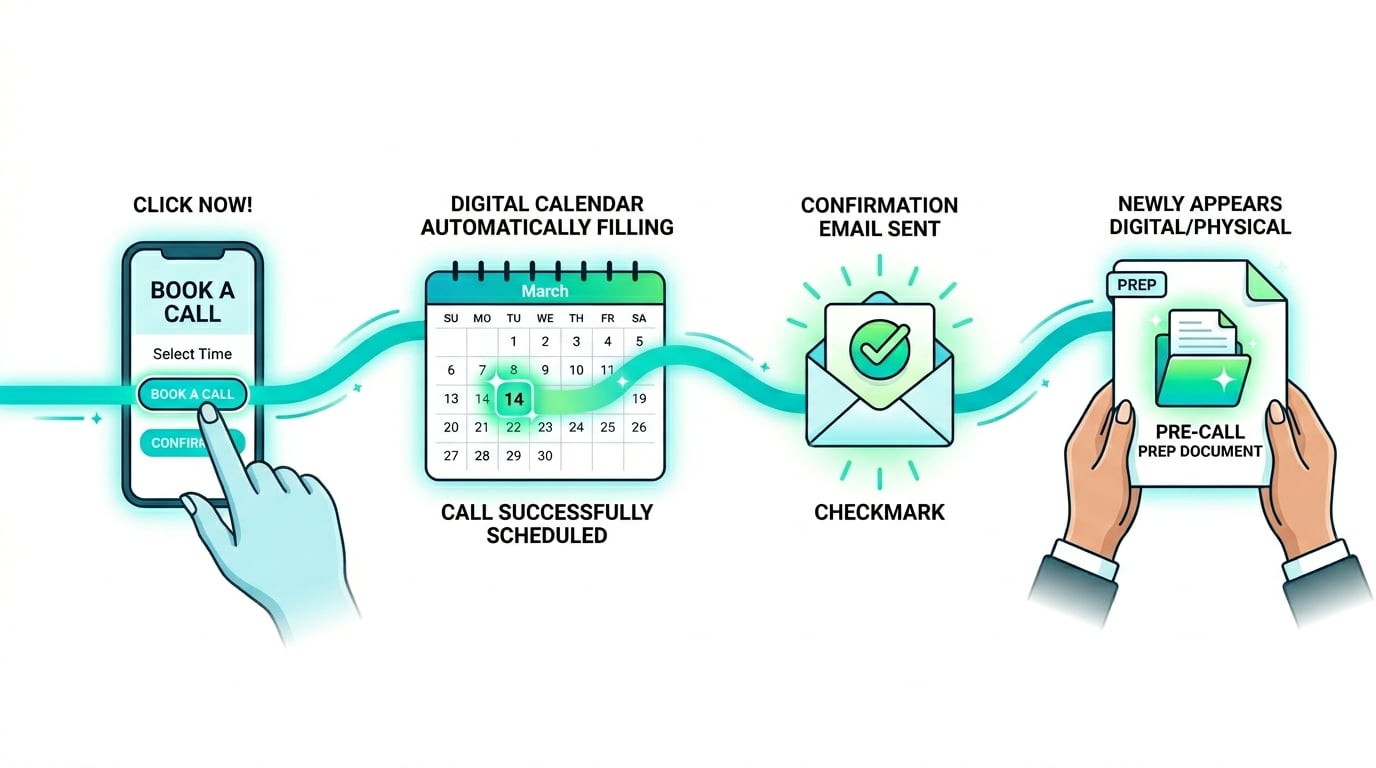
Every consultation carries a stack of admin work, most of it before the patient arrives.
Confirming the booking. Sending the intake questions. Writing reminder texts. Preparing the patient. Following up when they do not show. None of this requires a human. All of it can run automatically from the moment someone clicks your booking link.
Here is the complete end-to-end medspa consultation booking automation, step by step.
What a Fully Automated MedSpa Consultation Booking Process Looks Like
Before diving into setup, here is the end state you are building toward:
Prospect fills inquiry form (from an ad or your site)
        ↓
Immediately receives booking link via email or SMS
        ↓
Books a time (with intake questions and deposit on the booking form)
        ↓
Receives confirmation with pre-visit prep info (automated)
        ↓
Receives 24-hour reminder (automated)
        ↓
Receives 1-hour reminder (automated)
        ↓
Consultation happens
        ↓
Tagged as "Booked Treatment" or "No Show" in your system (manual)
        ↓
Different follow-up sequence fires based on tag (automated)
Every arrow in that chain except the final tag is handled automatically. Your team runs the consultation, and the system handles everything else.
Step 1 — The Booking Page With Intake Questions and a Deposit
The foundation of the whole system is your booking platform. Boulevard, Mangomint, Vagaro, and Zenoti are built specifically for medspas and let you embed intake questions and collect a deposit directly on the booking page — so by the time a prospect confirms a time, you already know:
- What treatment they are interested in
- Whether they have had it before
- Any relevant health history your intake form requires
- How they found you
Recommended questions (keep it to 3–4 maximum — more than this reduces booking completion):
- “What treatment are you interested in?” (Multiple choice)
- “Have you had this treatment before?” (Yes/No)
- “Any allergies or conditions we should know before your visit?” (Long text)
- “How did you hear about us?” (Multiple choice)
Deposit collection: Requiring a small deposit through Stripe or Square at the time of booking is one of the most effective no-show deterrents available. Patients who have money on the line show up. Most medspa booking platforms support this natively — check your platform’s settings before building a separate Zapier workflow for it.
Setup: In Boulevard or Mangomint, go to your service settings and add intake questions plus a deposit requirement. These responses sync to your patient record automatically, and can be passed to other tools via Zapier if you need them elsewhere.
Step 2 — Automated Confirmation With Pre-Visit Prep
Immediately after booking, your patient should receive a confirmation that does more than confirm the time. It sets the frame for the visit.
This confirmation should include:
- Confirmation of the date and time (most booking platforms send this by default — customize the template)
- What the visit will cover (3 bullet points — sets expectations, reduces no-shows)
- Any pre-treatment prep instructions relevant to the service booked
- Optional: a short video introducing your clinic (a 90-second Loom-style recording converts exceptionally well here)
Automation: Boulevard, Mangomint, and Vagaro all send a basic confirmation automatically. Customize the confirmation message in your platform’s notification settings — no Zapier needed for this step.
For a more customized sequence, use Zapier to trigger a GoHighLevel email or SMS when a new appointment is created. This gives you full control over design and content beyond your booking platform’s basic templates.
Step 3 — The 24-Hour and 1-Hour Reminder Sequence
No-shows are expensive, and they get more expensive the closer to game time a slot goes empty with no way to refill it. If empty chairs are a weekly event, start with your reminder sequence.
Built-in reminders (the minimum you should have, available in Boulevard, Mangomint, Vagaro, and Zenoti):
- Reminder: 24 hours before the visit
- Reminder: 1 hour before the visit
Beyond platform defaults, use Zapier to trigger SMS reminders via Twilio or a tool like GoHighLevel. An SMS reminder sent 24 hours before the visit, combined with an email reminder, reaches patients who never open email.
The content of your reminders matters — and it must stay free of treatment specifics for privacy reasons:
24-hour reminder: “Your upcoming appointment with [Clinic Name] is tomorrow at [time]. Reply YES to confirm or use this link to reschedule: [link].”
1-hour reminder: “Your upcoming appointment starts in one hour. Address: [location]. If something has come up and you need to reschedule, use this link: [reschedule link].”
Short. Specific. Useful. Not just “Your appointment is soon” — and never naming the specific treatment in a text message.
Step 4 — Post-Visit Follow-Up Based on Outcome
This is where most medspa consultation booking automations stop — and where the most valuable automation begins. For the complete guide to building follow-up sequences that convert without feeling pushy, see the full framework here.
After the visit, your front desk does one thing manually: tag the patient in your system based on the outcome. Everything that follows is automated based on that tag.
Tag: “Booked Treatment” → Sequence A fires:
- Message 1 (Day 1): “Great seeing you. Here is a recap of what we discussed and your recommended plan.” (Link the treatment plan or package details.)
- Message 2 (Day 3): A relevant patient result story (kept general, no identifying details)
- Message 3 (Day 7): A direct follow-up asking if they have questions before scheduling their next visit
Tag: “No Show” → Sequence B fires:
- Message 1 (within 2 hours): “Looks like we missed each other. Here is a link to rebook at a time that works better.” (No guilt-tripping — just make it easy to reschedule.)
- Message 2 (Day 3): A value-delivery message that re-warms them before the second ask
- Message 3 (Day 7): One more invitation to book with a soft deadline
Tag: “Not Ready Yet” → Sequence C fires:
- Enter them into the long-term nurture sequence (monthly value emails, no pitches, for up to 6 months)
- Tag them for re-engagement when you launch a new treatment package or promotion
Setup: Use Zapier to watch for new tags in your booking platform or CRM (Boulevard, Mangomint, Aesthetic Record, or GoHighLevel), then trigger the corresponding sequence. If you want to use AI to write these post-visit sequences, here is exactly how to prompt it for medspa email copy.
Tools Required
| Step | Tool | Monthly Cost |
|---|---|---|
| Booking page | Boulevard, Mangomint, or Vagaro | $10–$16 per provider |
| Confirmation + prep | Platform native or GoHighLevel | Free–$97 |
| SMS reminders | GoHighLevel or Twilio | $97 or pay-per-text |
| Deposit collection | Stripe or Square (often built in) | Standard processing fees |
| Patient tagging | Aesthetic Record, Boulevard, or GHL | $20–$97 |
| Post-visit sequences | GoHighLevel | $97 |
| Automation connector | Zapier or Make | $0–$19 |
For a simple setup (no SMS, basic sequences), you can run this entire system for under $100/month in tool costs on top of your existing booking platform.
How Long to Set This Up
DIY estimate: One weekend for the core system (booking platform + confirmation + reminders + deposit). An additional weekend for the post-visit sequences and tagging.
Done-for-you: 5–7 days as part of any automation package.
The Compounding Effect
When this system is running, every consultation is better than it was before — because patients arrive prepared, reschedule less frequently, and receive a faster, more consistent follow-up.
The clinics that consistently convert a high share of consultations into booked treatment plans almost always have a system like this running in the background. Consultation quality matters, yes — but the infrastructure around the visit determines how many qualified consultations happen and how well the follow-up performs. This is one example of how AI and automation are reshaping the industry — here is the full picture of what is actually changing in 2026.
Book a strategy call if you want this built for your specific stack, or see the full list of automations included in each package.